
1. What you need to know 2. The benefits 3. Start create patient encounter
1. What you need to know
Every event of the service types: Emergencies, Hospitalization or Ambulatory, will be registered in the system as a new record.
The system will let you capture the information of the primary care physicians who admitted the patient, the physician who referred the patient as well as their specialities, also the patient time of arrival, time of admission and the time when the patient started with the symptoms, the reason of the consultation and the medical observations.
You can merge the information of two encounters.
Important :
-
In order for you to indicate the arrival of a pregnant patient (whether for consultation or during labor) in this window, two basic rules must be met:
-
This patient must be a woman
-
This patient must be at least 8 years old.
If these two rules are not met, you will not be able to activate the Is Pregnant check:

-
To register a newborn, it is through the Newborn Registration portal:
Newborn Registration
-
2. The benefits
Create a patient encounter for applying and managing charges of a patient care.
3. Start creating a patient encounter
1. Open the Current encounter window.
2. Click on New record.
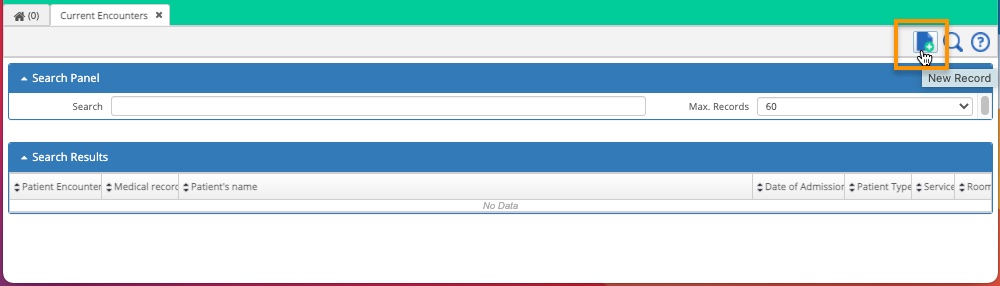
Creating the patient encounter.
1. The system will open up the Search window: capture the name of the patient whose account will be created, select patient and click on "Accept".
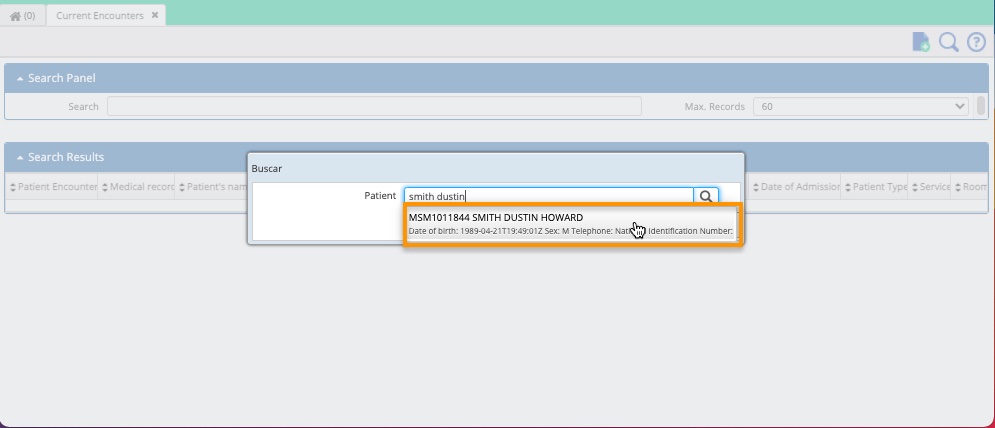
Selection of the patient.
1. The system will open up the Encounter window where you must fill out the form with the required information and Save it.

Capturing the data.
1. After saving the information, the encounter will be created.

After finishing the steps listed above
You'll have created the patient encounter.
Congratulations!
Comments
0 comments
Article is closed for comments.