
1. What you need to know 2. The benefits 3. Start global bill
1. What you need to know
1. It requires the configuration of one type of Diverse Charge for each Category of the product . That is not mandatory, because the system generates automatically the diverse charge when creating the global bill, just make sure to have the accounting account configured in the Accounting Schema/Predetermined/General/National Income Charges that's what it takes when processing the charge.
2. The remit notes must be paid in full and not invoiced.
2. The benefits
The identification and creation of global bills by hospital areas.
The optimization of the process of cancelling remissions of completed global bills.
3. Start global invoice
Create a global bill following the next steps:
1. Open the window Global Bill.
2. Click on the New Record button.
3. *Search the remissions using the search dashboard filters: client, area, dates range (90 days is the top range), category of the product, product or document number; and click on the Search button.
4. Select the remit notes that will be includes in the global bill.
5. Save.
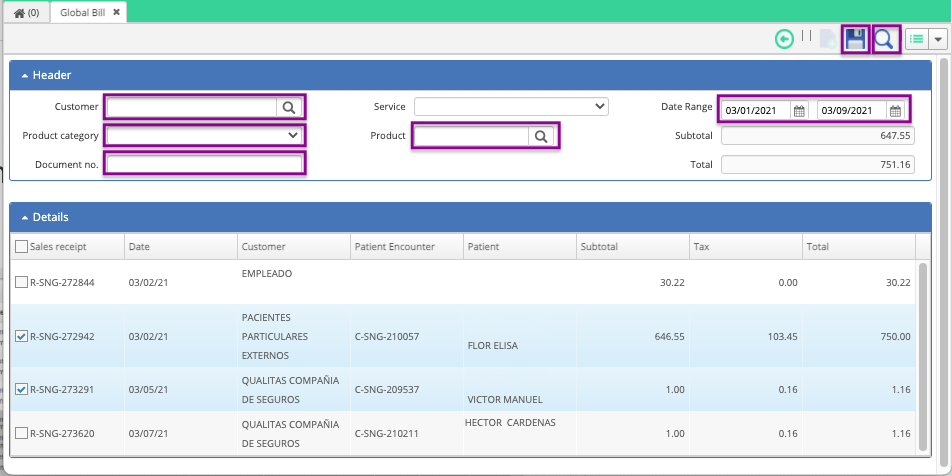
Creation of a global bill.
1. Click on the Processing button to create the global bill.
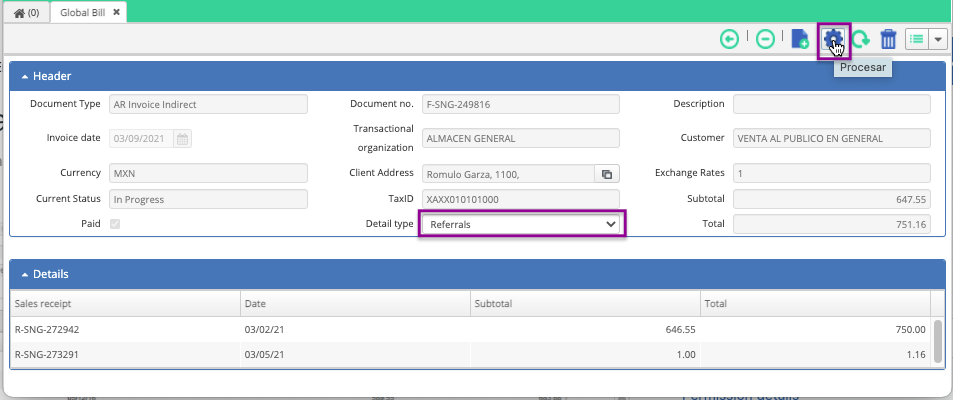
1. The system generates a compressed folder containing the XML and PDF files.
Generation of the XML and PDF files.
After following the aforementioned steps
You'll see the completed global bill in the search dashboard.
Congratulations!
Comments
0 comments
Article is closed for comments.