
1. Diagnostics - Classification and Relations 2. Electronic Patient Record - Patient Account History
SECTION: 1. Diagnostics - Classification and Relations
We made an improvement to Patient Diagnostic, now you can use that information in the following processes:
- OutPatient consultation, where you can add the diagnostic to the prescription.
- InPatient, where you can add the diagnostic when you enter an indication or treatment for the patient.
Now, you can include the correct classification of the diagnostic, make relations between them and the information will be available in both aforementioned processes to avoid recapturing it.
Let's see what's new and how to use it.
In the window "Patient Diagnostic" you'll see the new field Classification, where you can select one of the following options: Primary, Secondary or Tertiary. You can have more than one primary diagnostic with their corresponding secondary ones.

- Once you've registered a diagnostic and its classification and/or relation with another one, you will be able to select it or associate it with a medication or with a laboratory or image service, when you create a medical indication or prescription.

- It is very important to update the diagnostic or add a new one, when changing the patient type or service. This can be done in the modules Encounter or Admission Orders/Information.

In the Electronic Patient Record, you will be able to consult the traceability of the patient diagnostics.

<<IMAGE_54-04>>
Don't hesitate to contact us in case you have a question.
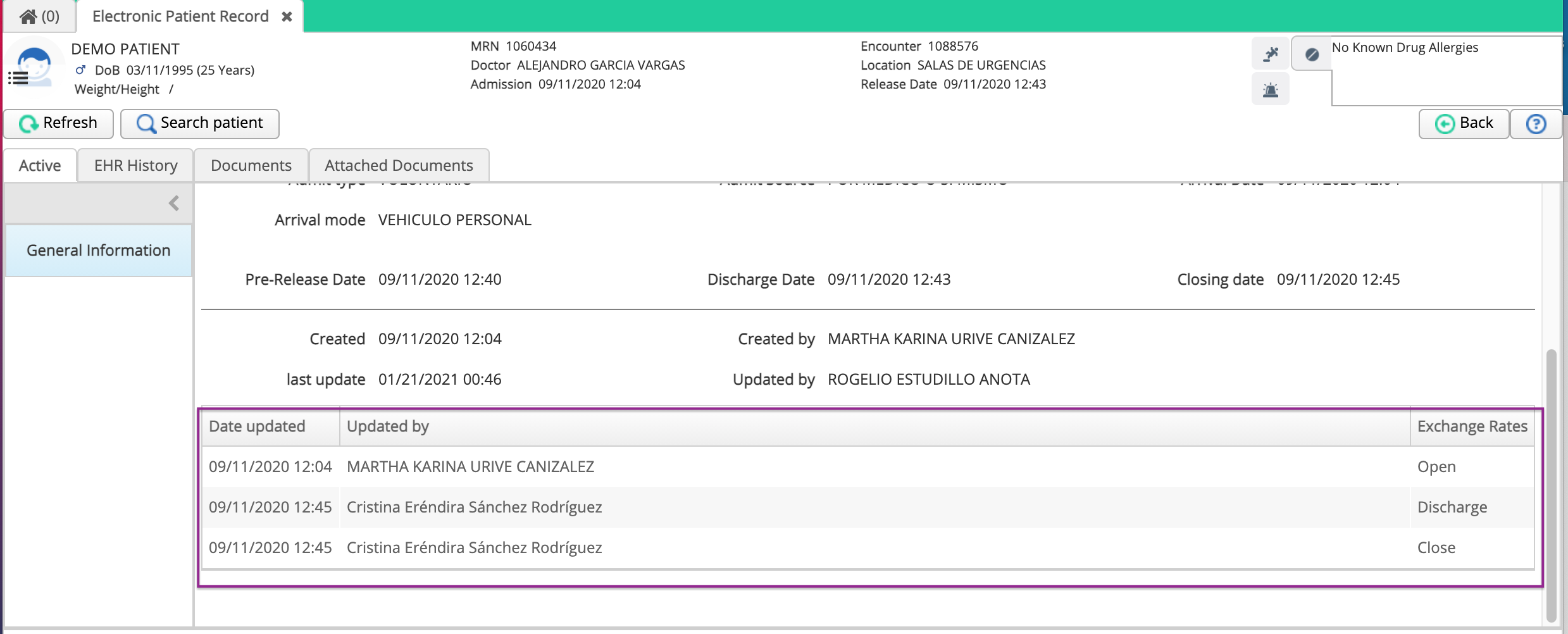
2. Electronic Patient Record - Patient account history
In the Electronic Patient Record, you will learn the historical information of the encounter. You can view who created the account, date of creation and the changes of the following status:
- Creation
- Admission
- Discharge
- Closure
- Unlock
We hope this improves your experience with Cirrus. Remember to share this information and ask for help if needed.
Date: December 16 2019
Comments
0 comments
Article is closed for comments.