
04/11/2019 - Changes have been applied for easier configuration of the Consignment module
To improve your Cirrus experience, we've made the following changes in order to simplify the use of Consignment products:
Within the Charge Master II window, you'll be able to associate the Business Partner to then consignment product when creating it, so this will automatically associate the Price List and Warehouse already set for that specific business partner record. (see animated GIF)
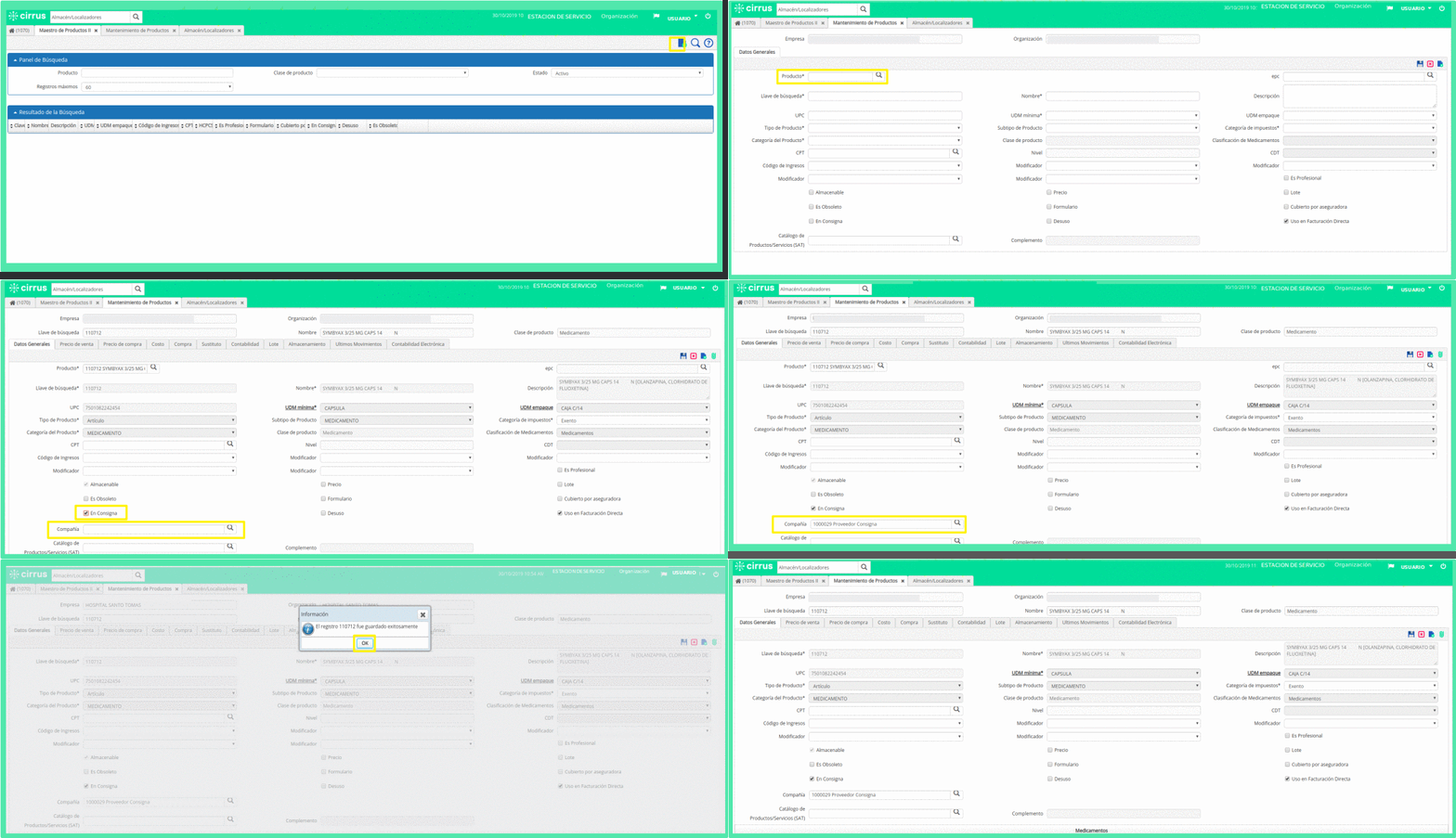
Once the product has been registered, open the tabs "Selling Price" and "Storage" to verify the price list and warehouse were properly associated.

To finalize the aforementioned process you must take into account the following settings:
- To have a supplier on consignment. Within the option Business Partner, check the option Uses consignment (see image) in order to make it show up in the module Warehouse & Locators. Keep in mind this supplier must have a "Price List" already configured to be added to the configuration as well.
After finishing setting up this functionality, you'll need to associate the *Business Partner* with a *Consignment Type Warehouse*. In order to get this done, a Tech Support ticket will be required to request this setting. *Business partner* and *Warehouse* need to be included in the ticket so the Cirrus staff will properly configure this association.
We hope this improves your experience with Cirrus. Remember to share this information and ask for help if needed.
Date: November 4, 2019
Comments
0 comments
Article is closed for comments.